
Home › The guide › Getting started › Controls
Controls
The game’s keys on PC, the mouse, and touch on phone. Every key can be changed from the controls screen.
In short
- On the keyboard, the keys below; they can all be changed from the controls screen, opened from the title screen or from the dungeon.
- With the mouse, a click on the ground walks, a click on a wild Pokémon attacks it, a click on a painted door in the Hollow goes through it.
- With touch, the game is played in landscape: you walk by touching a tile, you attack by touching a wild Pokémon, you talk to a calmed Pokémon by touching it.
Default keys
The defaults are laid out for a French keyboard: the four movement keys are Z, Q, S, D. On a keyboard with another layout, the keys keep their physical position.
| Action | Key |
|---|---|
| Move up | Z |
| Move down | S |
| Move left | Q |
| Move right | D |
| Run | Maj |
| Turn in place | F |
| Wait a turn | X |
| Regular attack | Espace |
| Move 1 | 1 |
| Move 2 | 2 |
| Move 3 | 3 |
| Move 4 | 4 |
| Move list | C |
| Bag | E |
| Talk | T |
| Gather the team | U |
| Collapse team | Tab |
| Map | M |
| Map legend | K |
| Grid | G |
| Request tracker | J |
| Message your friend (co-op) | B |
| Auto dialogue | L |
| Controls screen | H |
The controls screen offers “Change keys”: pick an action, press the key you want. “Default keys” puts everything back. The setting is kept with your save.
The action bar
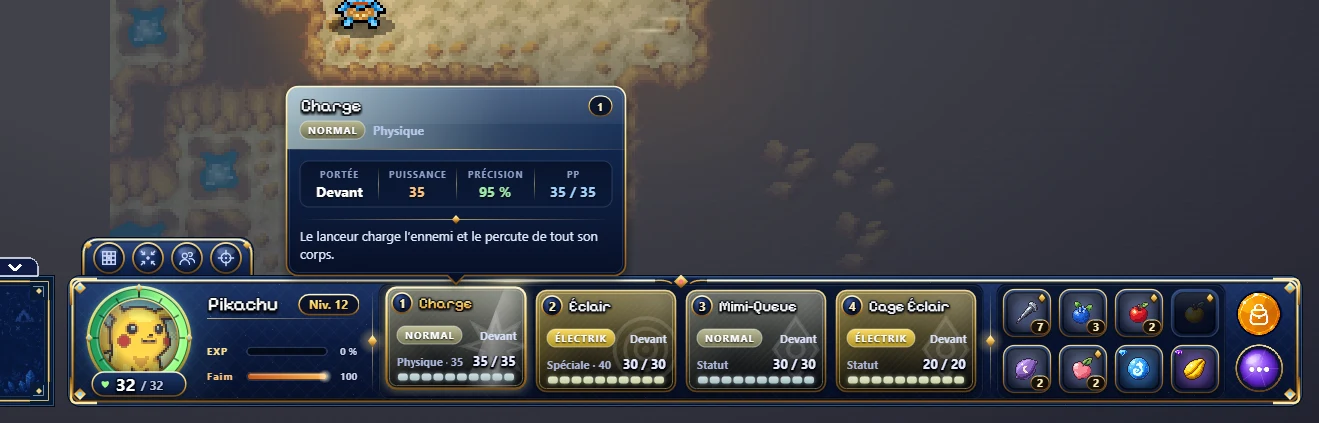
At the bottom of the dungeon screen, the action bar shows the Pokémon you control, its HP, experience and hunger, then its four moves with their PP, and free slots where you can pin items from the bag: a seed, a berry, an orb can then be thrown or used in one gesture, without opening the bag. On PC, drag the item from the bag to a slot; with touch, keep your finger on it.
With the mouse
- Walk: click on the ground; the team takes the shortest path, and stops if a wild Pokémon appears.
- Attack: click on a hostile wild Pokémon.
- Talk: click on a calmed Pokémon, Gholdengo the merchant included.
- In the Hollow: click on the ground to walk; pushing against a wall goes through the door there, and the painted doors can be clicked.
With touch
On phone and tablet, the game switches to landscape. You walk by touching a tile; touching a hostile wild Pokémon attacks it, touching a calmed Pokémon talks to it, and from afar the hero walks up to it first. The Attack button strikes in front of you. The dungeon menus (bag, moves, map, team) have their buttons on the bar.
See also
- BattleTurn by turnEvery step is a turn, and the wild Pokémon act after you. The possible actions, the ranges, what makes up damage, the regular attack, and natural HP recovery.
- Getting startedFirst stepsNew to PDMN? Here is the essential to get off to a good start, from the Hollow to the bottom of the first dungeons: the duo, the camp, turn-based play, items, recruiting, the Molt, saving.